Remember the database that I converted to mysql? yes, an innovation that I did :) I got mysql database to work with pkgdb2 so the link is not broken anymore. pkdgdb2 was not officially tested with mysql, therefore, I became the first person to do it. Although the pkgdb2 was tested with sqllite database, it was not working with it. I will update my blog with more details later on. Meanwhile, you can check the working version of pkgdb2 here: http://ireland.proximity.on.ca:8080/pkgdb2
Every Tab should work except the "login" button. That goes to FAS login, so I dont think we need to get it working.
Sunday, 15 December 2013

Saturday, 14 December 2013
Successfull Deployment of Fedora Package Database(pkgdb2) on ireland(could be my release 0.3 if I cannot get help to test it with a database)
As I said in my last blog post that I would try it on a new VM. I installed Fedora 19 from scratch and this time I did not install pkgdb2 under python/site-scripts, however, I ran it directly from clone to see if that makes a difference. Unfortunately, it did not make any difference. We know for sure that it is hitting the right database but somehow the connection is not opening up properly. I have left a message for Pierre on github and I am online since about 36 hours with very little sleep, waiting to catch him on IRC.
I got access to ireland on Friday, and was told by Chris to deploy the the instance on there. Therefore, however much installation was completed, I successfully set it up Fedora Package Database on ireland.proximity.on.ca. Also, I set it up on virtual-host running on port 8080. If anybody wants to check out the deployment they can do so on this url: http://ireland.proximity.on.ca:8080/pkgdb2
Keep in mind, as there is no database to test with, if you click on any link you will get a 500 internal server error as the config files are not properly communicating with the sample sqlite database. Here is a screen-shot of the instance:

In my desperation of testing my achievement with a database, I even converted the sample database to mysql and tried to test it with it. I thought I had to change only a couple of "dbi_url" lines, however, there was much to change in the core python scripts that I do not possess knowledge of.
If I could not test it with a database by tomorrow 6pm then I will just document the process of pkgdb2 deployment(as far as I could deploy it).
I got access to ireland on Friday, and was told by Chris to deploy the the instance on there. Therefore, however much installation was completed, I successfully set it up Fedora Package Database on ireland.proximity.on.ca. Also, I set it up on virtual-host running on port 8080. If anybody wants to check out the deployment they can do so on this url: http://ireland.proximity.on.ca:8080/pkgdb2
Keep in mind, as there is no database to test with, if you click on any link you will get a 500 internal server error as the config files are not properly communicating with the sample sqlite database. Here is a screen-shot of the instance:

In my desperation of testing my achievement with a database, I even converted the sample database to mysql and tried to test it with it. I thought I had to change only a couple of "dbi_url" lines, however, there was much to change in the core python scripts that I do not possess knowledge of.
If I could not test it with a database by tomorrow 6pm then I will just document the process of pkgdb2 deployment(as far as I could deploy it).
Pkgdb2 - 5 hours of head scratching till 6 in the morning
Thursday night after I finished my exams and sat down to install pkgdb2, I made some progress but got stuck in getting a database together to test the pkgdb2 with. Luckily, I found Pierre- the package author, online 1 in the morning.
I started asking him questions and we were trying to resolve why the template database that comes with the clone, not working with this installation. We checked all the important python scripts in a spree of "fpaste" then figured out that my mod_wsgi file is pointing towards the clone and not the installed pkgdb2 directory. So we fixed that and I installed Sqlite manager to see if the database is good and it was. Then we were checking the httpd logs and it still says "table Package" not found. We know from the trouble shooting "print" statements in the script that it is pointing towards the right database but still it gave the same error. Even Pierre said "Now even I don't know what is wrong" :)
Anyhow, I installed A new VM to conduct a fresh installation from scratch and see if it works this time.
I started asking him questions and we were trying to resolve why the template database that comes with the clone, not working with this installation. We checked all the important python scripts in a spree of "fpaste" then figured out that my mod_wsgi file is pointing towards the clone and not the installed pkgdb2 directory. So we fixed that and I installed Sqlite manager to see if the database is good and it was. Then we were checking the httpd logs and it still says "table Package" not found. We know from the trouble shooting "print" statements in the script that it is pointing towards the right database but still it gave the same error. Even Pierre said "Now even I don't know what is wrong" :)
Anyhow, I installed A new VM to conduct a fresh installation from scratch and see if it works this time.
Thursday, 12 December 2013
Some Progress FINALLY! Fedora Package Database - should have been my release 0.2
For so long I had been stuck in getting the Fedora Package Database running. I deployed the test instance for my first release but could not do much after that as I was unable to install the Fedora Package Database. I tried to get in contact with Pierre the author of pkgdb2, he was replying on github but could not get a hold of him on IRC.
Anyhow, I sat determined today to do it myself. Started to analyze the output that I was getting when I was trying to run the setup.py scritpt. It was giving me an import error flask.ext.fas_openid module not found. I researched and found some reference to it in github on python-fedora and saw the same guys who manage pkgdb1 and 2 discussing something about that module there.
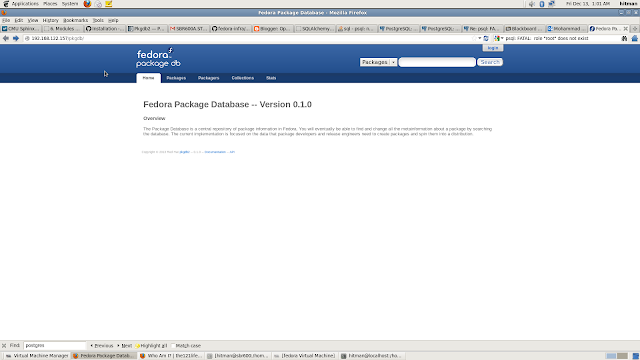
I uninstalled python-fedora and rebuilt it, but this time I got the source from github because I thought they have the most update version and I was right. I installed python-fedora from there and I stopped getting that error and my beloved pkgdb2 built successfully. Here is a screenshot of the new deployment. Notice that it is running on the IP address with the proper alias this time and not a random port number. Actually I configured the alias to be pkgdb, I can change it to pkgdb2 or anything else according to our requirements.
 Now, the only thing I am missing is a database to test this deployment with. I am currently working on trying to get Pierre's script working to convert the previous packagedb database to match the new schema, I will try to use that and blog if it works.
Anyhow, I sat determined today to do it myself. Started to analyze the output that I was getting when I was trying to run the setup.py scritpt. It was giving me an import error flask.ext.fas_openid module not found. I researched and found some reference to it in github on python-fedora and saw the same guys who manage pkgdb1 and 2 discussing something about that module there.
I uninstalled python-fedora and rebuilt it, but this time I got the source from github because I thought they have the most update version and I was right. I installed python-fedora from there and I stopped getting that error and my beloved pkgdb2 built successfully. Here is a screenshot of the new deployment. Notice that it is running on the IP address with the proper alias this time and not a random port number. Actually I configured the alias to be pkgdb, I can change it to pkgdb2 or anything else according to our requirements.
 Now, the only thing I am missing is a database to test this deployment with. I am currently working on trying to get Pierre's script working to convert the previous packagedb database to match the new schema, I will try to use that and blog if it works.
Sunday, 8 December 2013
0.2 - Pending release - waiting to communicate with Package mantainers
I did not get a chance to update my blog, however, I made some progress after 0.1. I tried to install Fedora Package database but kept running into errors that I have no clue about. It has something to do with importing the existing database to be used with pkgdb2. I am waiting to catch any of the package mantainer on IRC channel so I can install pkgdb2 while I am communicating with them. This way I don't have to report all the bugs/issues on Github or bugtrackker. This is a one time shot. I just have to catch them once and the installation can be done at that time.
Saturday, 23 November 2013
Release 0.1.1 - Pkgdb2 succesfful deployment of temporary instance
1. Install needed packages:
sudo yum install python-virtualenv libpq*
2. Get pkgdb2
git clone https://github.com/fedora-infra/packagedb2.git
3. Go inside packagedb2 folder
cd packagedb2
4. run virtual env
$ virtualenv my-pkgdb2-env
5. run this command
$ source my-pkgdb2-env/bin/activate
your prompt will change to my-pkgdb2-env now
6. Run these commands to install dependencies:
(my-pkgdb2-env)$ pip install kitchen paver urllib3
(my-pkgdb2-env)$ pip install git+https://github.com/fedora-infra/python-fedora.git
(my-pkgdb2-env)$ pip install -r requirements.txt
(my-pkgdb2-env)$ pip install -r test_requirements.txt
7. if everything went without errors then run this command to download a temporary
database for your instance
(my-pkgdb2-env)$ ./runtests.sh
this will take some time
8. If the result came out as "OK" then start the server:
(my-pkgdb2-env)$ python runserver.py
9. Once started, open your favourite browser and type the following URL:
http:127.0.0.0:5000
I was able to get the instance up and running. Here is a screen-shot of the new pkgdb2

Wednesday, 20 November 2013
Release 0.1 - service sbrproject restart
The Main Goal
My main project was to port fedpkg to pidora so fedpkg would work with Pidora packages. For that I needed to install Fedora Package Database as fedpkg communicates with it and then modify it for Pidora packages.Release 0.1
What Now?
After a group meeting with Chris Tyler and package maintainers, we decided that I should proceed with the installation of pkgdb2, which, although is not ready yet, will be ready soon and maintained. It would not make sense to deploy a package which will go out of date very soon. Moreover, it would also not make sense to deploy pkgdb1 for Pidora as Fedora Package Database has several uses.
Subscribe to:
Posts (Atom)
How to add "Discord" in Steam's Big Picture Mode
With the release of Steam deck a lot of people are turning into Steam Deck Big Picture Mode(BPM) to enjoy an exclusive gaming experience, t...
-
1. Make sure you are directly connected to the router through a cable · Take an ethernet cable from y...
-
Since most of the Linux administration practice is done in a virtual environment, I thought I should create a video about it, as I am aware ...
-
These instructions are from Spotify's Website: # 1. Add the Spotify repository signing key to be able to verify downloaded packages sud...
